Subscriptions
Manage the complete lifecycle of your customer subscriptions from creation to recurring billing
Subscription Management
Subscriptions are automatically created when you assign a Plan to a Customer. They connect plans, customers, and billing cycles in an automated workflow that handles recurring billing, feature access, and usage tracking.
The Platform section is designed for go-to-market, finance, and operations teams. If you need implementation details, go to the Developer Library.
Quick start example
Here's how subscriptions work with Commet's plan-first model:
- Create Plans: Define your pricing tiers (Starter, Pro, Enterprise) with features and prices
- Assign Plan to Customer: Select a customer and assign a plan—the subscription is created automatically
- Automatic billing: Once active, Commet automatically generates recurring invoices each billing period
- Manage lifecycle: Upgrade, downgrade, or cancel subscriptions as customer needs change
The billing engine handles the entire cycle: Plan assignment → Subscription creation → Checkout → Activation → Recurring billing.
Why subscriptions matter
- Automated recurring billing: Once active, subscriptions automatically generate invoices each period without manual intervention
- Complete lifecycle control: Manage states, cancellations, and renewals from a single place
- Full visibility: Access invoice history, payments, and customer details in real time
- Plan-based simplicity: Subscriptions inherit all configuration from plans, making management easier
- Automatic creation: No manual subscription setup needed—just assign a plan to a customer
Plan-first subscription model
In Commet, subscriptions are not created manually from the platform interface. Instead, they are automatically created when you assign a Plan to a Customer.
How it works
Create your Plans with all pricing, features, and billing intervals configured
Assign a Plan to a Customer — this automatically creates a Subscription
The Subscription starts in the appropriate status based on payment and trial settings
This plan-first approach ensures:
- Consistency: All customers on the same plan get the same configuration
- Simplicity: No need to manually configure each subscription
- Scalability: Easily manage hundreds or thousands of subscriptions
- Updates: Modify plans and future assignments use the updated configuration
Learn more about creating and managing Plans in the Plans documentation.
How subscriptions are created
Select or create customer
Navigate to Customers in the platform and select the customer you want to assign a plan to. If the customer doesn't exist yet, you can create them directly from the customer management section.
Important: The customer's email is used as the delivery address for the payment link and cannot be modified in the checkout. Make sure to use the correct email from the start.
Assign a plan
From the customer detail page, click Assign Plan or Change Plan. You'll see all available plans:
- Public plans: Plans visible on your pricing page
- Private plans: Internal plans not shown publicly (useful for enterprise deals)
Select the plan you want to assign. You can also choose:
- Billing interval: Monthly, quarterly, or yearly (if the plan supports multiple intervals)
- Initial seats: For plans with seat-based features, set the starting seat count
- Skip trial: Optionally skip the trial period if the plan has one configured
Subscription is created automatically
When you confirm the plan assignment, Commet automatically:
- Creates a Subscription for the customer
- Links the subscription to the selected plan
- Sets the billing interval and initial configuration
- Generates a checkout link if payment is required
The subscription status depends on the plan configuration:
- Trialing: If the plan has trial days configured
- Pending payment: If payment is required to activate
- Active: If no payment or trial is needed
Subscription lifecycle
Subscriptions go through different states during their lifetime:
| State | Description | When it occurs |
|---|---|---|
Draft | Subscription created but not activated | When created programmatically for review |
Trialing | Customer in free trial period | When plan has trial days and trial hasn't ended |
Pending payment | Customer received checkout but hasn't paid | Immediately after plan assignment if payment required |
Active | Subscription is billing normally | After trial ends or payment is completed |
Paused | Temporarily paused (no billing) | When manually paused by operations team |
Past due | Payment failed, in grace period | When payment method fails |
Canceled | Canceled, no longer billing | When customer cancels or subscription ends |
Expired | Reached end date | When subscription reaches scheduled end |
Subscription details
Each subscription includes complete information to manage the billing cycle:
Current plan information
- Plan name: See which plan the customer is subscribed to
- Billing interval: Monthly, quarterly, or yearly
- Plan features: View all features included in the plan
- Trial status: Check if subscription is in trial period
Billing information
- Current period: Start and end dates of the current billing cycle
- Days remaining: How many days until the next invoice
- Next invoice date: When the next recurring invoice will be generated
- Amount: Current plan price for the selected billing interval
Feature usage
For plans with metered or seat-based features:
- Current usage: Track consumption in real-time
- Included limits: See what's included in the plan
- Overage: Monitor usage beyond included amounts
- Seat counts: Current seat allocation per seat type
Learn more about how features work in plans in the Features documentation.
Checkout link
- View current link: Access the payment link generated for the customer
- Regenerate link: If the checkout expired or you need a new link, you can regenerate it (only available if the subscription is not active)
- Delivery to customer: The checkout link is sent automatically to the customer's email. If you're using the SDK, you can also integrate the link directly into your onboarding flow.
Generated invoices
- Complete history: View all invoices generated for this subscription
- Automatic billing: Each billing period automatically generates a new invoice
- Payment details: Review payment status, due dates, and payment methods
Customer information
- Contact data: Quickly access the associated customer information
- Subscription history: View all active and historical subscriptions for the customer
- Billing configuration: Review currency, payment terms, and billing address
Managing subscriptions
Change plan (upgrade/downgrade)
Navigate to the customer detail page
Click Change Plan on the active subscription
Select the new plan
Commet automatically handles proration:
- Credits unused time from the current plan
- Charges for the new plan going forward
- Adjusts the billing cycle accordingly
Automatic proration: Commet calculates credits and charges automatically when changing plans. The customer is charged or credited based on the time remaining in the billing period.
Cancel subscription
Navigate to the customer detail page
Click Cancel Subscription on the active subscription
Optionally provide a cancellation reason
Choose when cancellation takes effect:
- Immediately: Stops billing right away
- End of period: Continues billing until current period ends
Canceled subscriptions remain visible for historical tracking but no longer generate invoices.
Regenerate checkout link
If a customer hasn't completed payment and the checkout link expired:
Navigate to the subscription details
Click Regenerate Checkout Link
Send the new link to the customer
This is more efficient than reassigning the plan or creating a new subscription.
SDK integration
All the steps described above can be performed programmatically through our SDK. This is the recommended way to integrate Commet directly into your application.
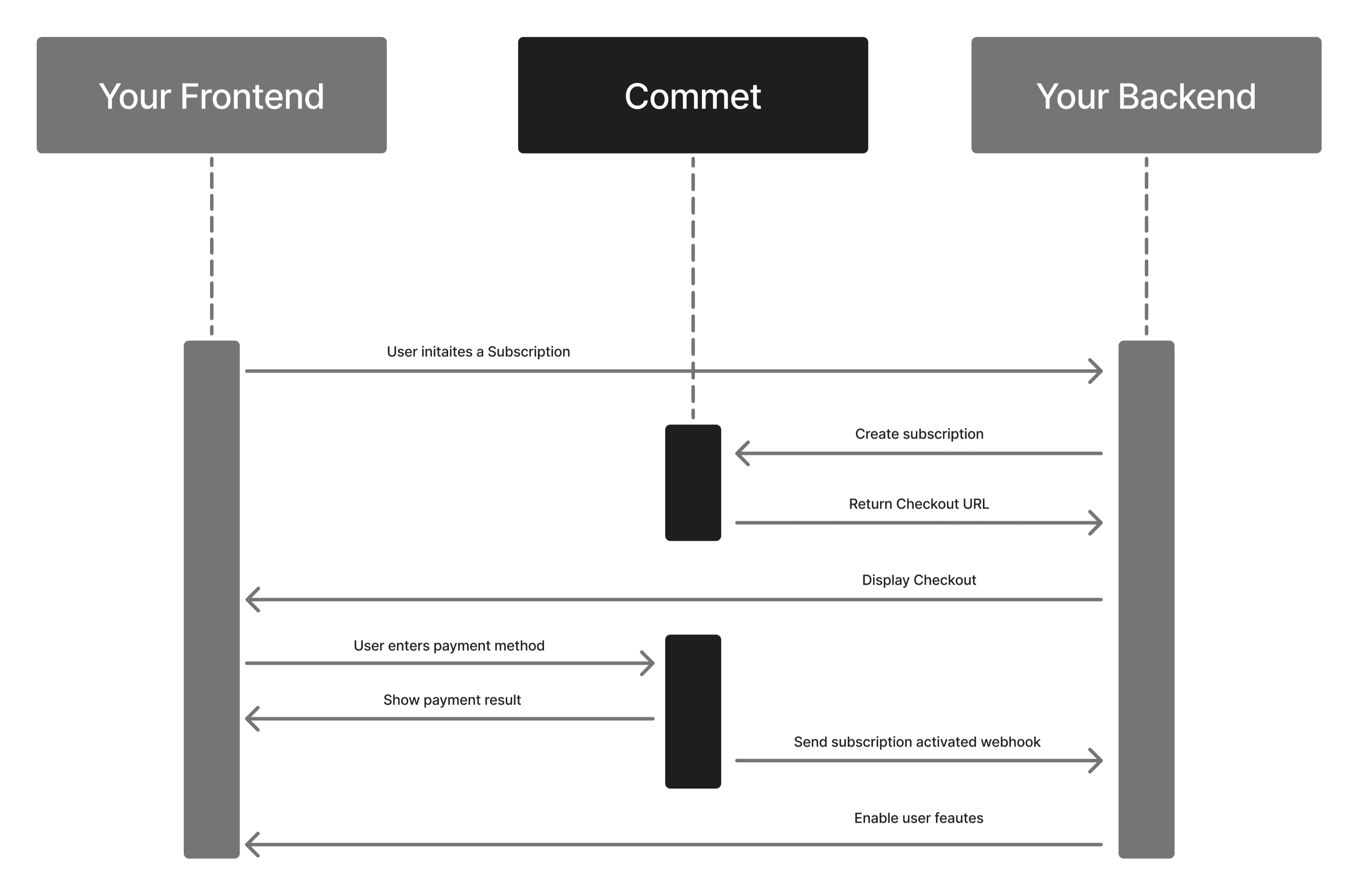
For in-app integrations: If you're building an integration within your application, use the SDK instead of the platform interface. This allows you to completely automate the subscription flow and keep everything synchronized with your system.
Advantages of using the SDK
- Complete automation: Assign plans and manage subscriptions directly from your code without manual intervention
- Real-time synchronization: Keep your data synchronized with Commet automatically
- Improved user experience: Integrate the checkout directly into your application without redirecting to external pages
- Scalability: Manage thousands of subscriptions programmatically without interface limitations
Typical SDK flow
List available plans: Use commet.plans.list() to show customers available options
Assign plan: Call commet.subscriptions.create() with a planCode to create the subscription automatically
Get checkout: Access the checkout link from the subscription response
Monitor usage: Track feature usage and seat counts through the subscription details
Manage changes: Upgrade, downgrade, or cancel through the SDK
For complete code examples and full API documentation, visit the Developer Library.
Related Resources
- Plans - Learn how to create and configure plans
- Features - Understand how features work in plans
- Usage Metrics - Track consumption for metered features
- Seat Management - Manage seat-based features
How is this guide?