Usage-Based Pricing
Complete guide to implementing consumption-based pricing models with usage metrics, real-time tracking, and flexible billing rules.
Usage-Based Pricing
Usage-based pricing allows you to charge customers based on their actual consumption of your product or service. Instead of flat monthly fees, customers pay for what they use—whether that's API calls, storage gigabytes, compute hours, or transactions processed.
Platform documentation aims at business operators. For SDKs, endpoints, and code samples head to the Developer Library Quick Start.
Why usage-based pricing
Usage-based pricing aligns your revenue directly with customer value. As customers consume more of your service, they pay more. This creates fair pricing that scales naturally with customer growth.
Problems it solves:
- Customers overpaying for unused capacity in fixed plans
- Difficulty acquiring price-sensitive customers who want to start small
- Revenue not scaling with actual product usage
- Complex pricing negotiations for variable consumption
- Lack of transparency in what customers actually pay for
Business outcomes:
- Revenue scales automatically with customer success
- Transparent billing that builds trust
- Flexible pricing that accommodates all customer sizes
- Data-driven insights into feature usage and value
How usage metrics work
Usage metrics are the foundation of consumption-based pricing. Here's the complete flow:
┌─────────────────┐
│  Application    │  Your app tracks customer activity
│                 │  (API calls, storage, transactions)
└────────┬────────┘
         │
         ▼
┌─────────────────┐
│  Usage Events   │  Real-time or batch event reporting
│                 │  { customer, metric, quantity, timestamp }
└────────┬────────┘
         │
         ▼
┌─────────────────┐
│  Commet         │  Aggregates events by billing period
│  Aggregation    │  Sum, Count, Max, Unique calculations
└────────┬────────┘
         │
         ▼
┌─────────────────┐
│  Pricing Engine │  Applies pricing model to aggregated usage
│                 │  (Linear, Tiered, Packaged, Percentage)
└────────┬────────┘
         │
         ▼
┌─────────────────┐
│  Invoice        │  Detailed line items with usage breakdown
│                 │  "25,000 API calls × $0.10 = $2,500"
└─────────────────┘
1. Define your usage metric
Create a usage metric that tracks specific customer behavior:
// Example: API calls usage metric
{
  id: "api-calls-metric-uuid",
  name: "API Calls",
  key: "api_calls",
  aggregationType: "sum",  // sum, max, unique, count
  unitLabel: "calls"
}
Common aggregation types:
- Sum: Total units consumed (API calls, storage GB, compute hours)
- Max: Peak concurrent usage (max simultaneous connections, peak compute)
- Unique: Distinct count (monthly active users, unique API keys used)
- Count: Number of events (transactions, deployments, builds)
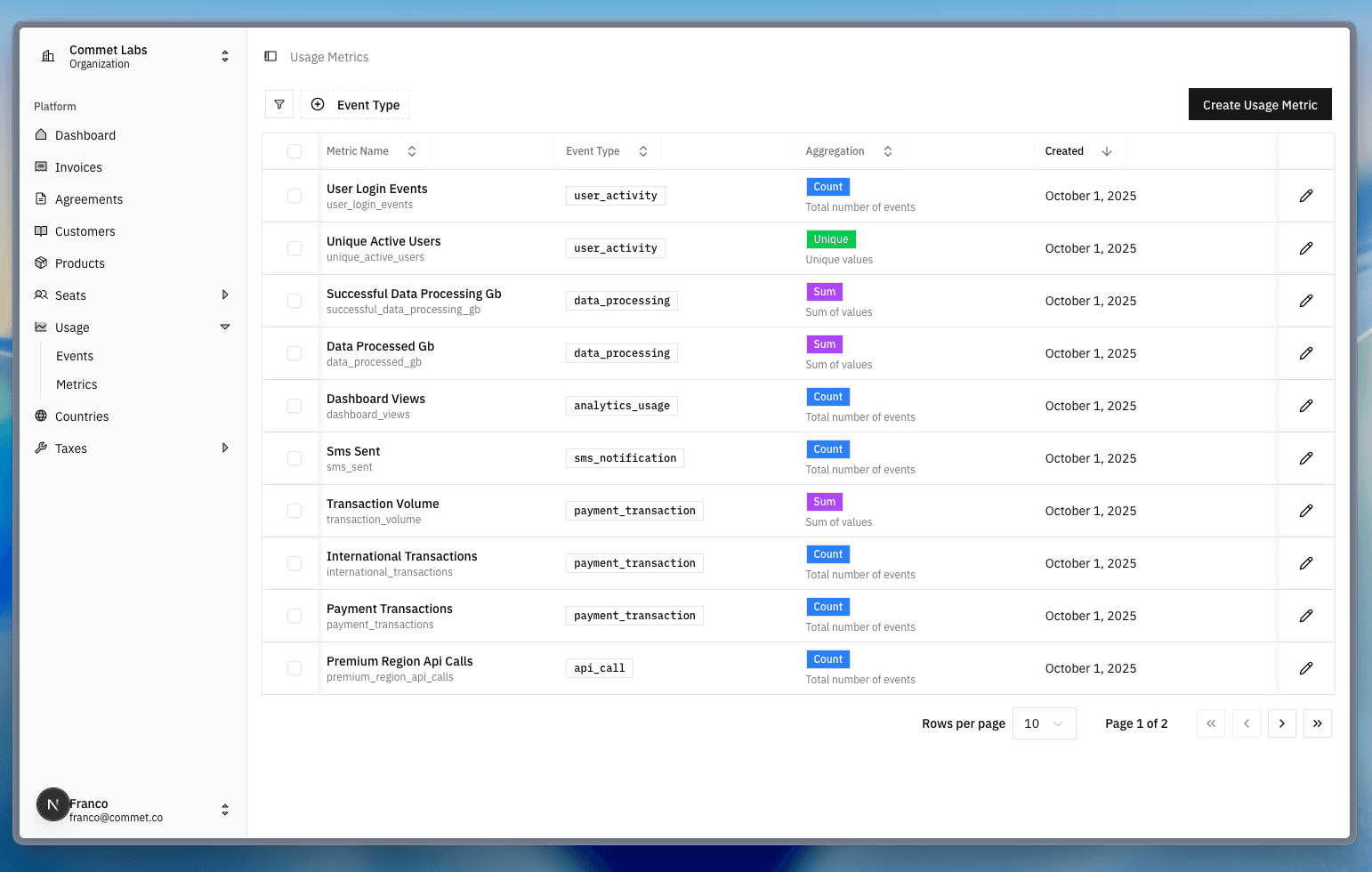
The usage metrics configuration shows how each metric is defined with its event type (user_activity, data_processing, payment_transaction, api_call) and aggregation method (Count, Sum, Unique) to properly track and bill consumption.
2. Send usage events
Your application reports usage to Commet:
// Real-time usage tracking
await commet.usage.track({
  customerId: "customer-uuid",
  metricKey: "api_calls",
  quantity: 1,
  timestamp: new Date(),
  metadata: {
    endpoint: "/v1/users",
    responseTime: "120ms"
  }
});

// Batch reporting for efficiency
await commet.usage.batchTrack([
  { customerId: "...", metricKey: "api_calls", quantity: 150 },
  { customerId: "...", metricKey: "storage_gb", quantity: 25.5 }
]);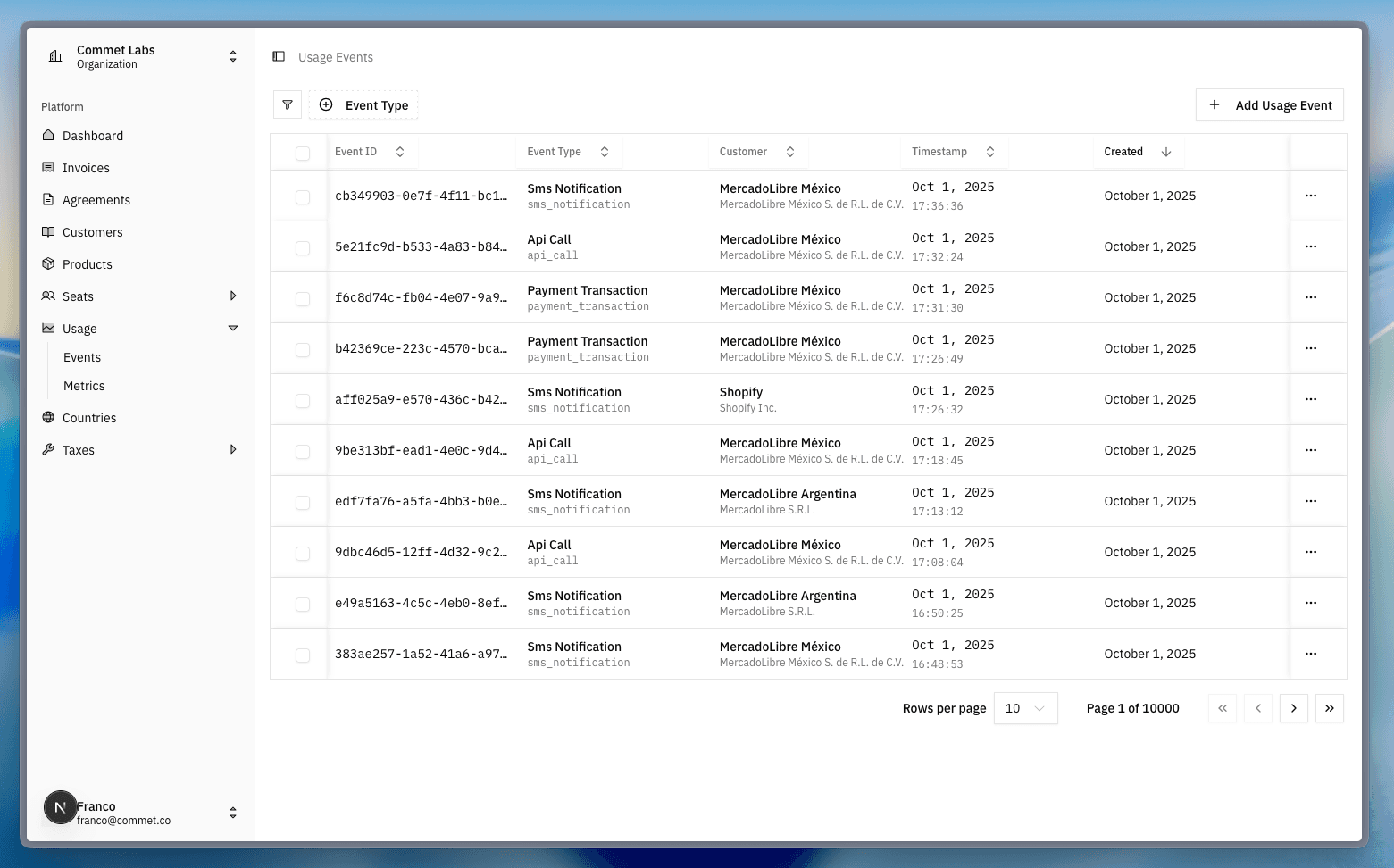
The usage events table shows individual tracking events with Event IDs, event types (sms_notification, api_call, payment_transaction), customer assignments, and precise timestamps for accurate billing period assignment.
3. Automatic aggregation
Commet aggregates usage data for each billing period:
- Daily aggregation: For real-time dashboards and alerts
- Billing period aggregation: For invoice generation
- Historical tracking: For analytics and trending
4. Apply pricing rules
Your configured pricing model calculates charges automatically:
// Linear pricing: $0.10 per API call
{
  pricingModel: "per_unit",
  unitAmount: 1000,  // $0.10 in cents
  usageMetricId: "api-calls-metric-uuid",
  includedUnits: 10000  // First 10K calls free
}

// Usage: 35,000 calls
// Calculation: (35,000 - 10,000 free) × $0.10 = $2,500
5. Generate transparent invoices
Usage charges appear as detailed line items:
API Calls Usage
35,000 calls × $0.10 = $3,500.00
(10,000 included units, 25,000 billable units)
Usage-based pricing models
Linear per-unit pricing
Charge a fixed rate per unit consumed. Simple, predictable, and easy to understand.
{
  pricingModel: "per_unit",
  unitAmount: 1000,         // $0.10 per call
  usageMetricId: "api-calls-uuid",
  includedUnits: 1000       // 1,000 free calls
}
Real-world examples:
- Twilio: $0.0075 per SMS sent
- OpenAI: $0.002 per 1K tokens (GPT-3.5)
- AWS Lambda: $0.20 per 1M requests
When to use:
- Simple consumption-based services
- Predictable unit economics
- Clear value per unit (API calls, messages, compute hours)
Percentage-based pricing
Charge a percentage of transaction value, perfect for payment processing or revenue-sharing models.
{
  pricingModel: "per_unit",
  isPercentageBased: true,
  percentageRate: 290,      // 2.9% in basis points
  minFeePerUnit: 30,        // $0.30 minimum per transaction
  maxFeePerUnit: 1000,      // $10.00 maximum per transaction
  usageMetricId: "payment-amount-uuid"
}
Calculation examples:
- $10 transaction: 2.9% = $0.29 → $0.30 (minimum applied)
- $100 transaction: 2.9% = $2.90 → $2.90
- $500 transaction: 2.9% = $14.50 → $10.00 (maximum applied)
Real-world examples:
- Stripe: 2.9% + $0.30 per transaction
- PayPal: 2.99% + $0.49 per transaction
- Shopify Payments: 2.4% + $0.30 per transaction
Percentage Pricing with Thresholds
When using percentage-based pricing, you can set optional minimum and maximum fees per unit to control edge cases:
- Min fee (
minFeePerUnit): Ensures minimum revenue per transaction (protects against micropayments) - Max fee (
maxFeePerUnit): Caps the maximum charge per transaction (protects customers from excessive fees)
Configuration example:
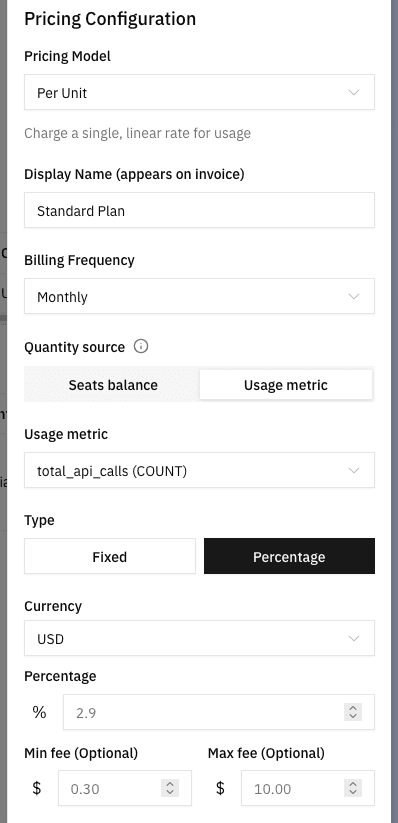
The percentage pricing configuration shows how to set up thresholds with Type: Percentage selected, including the percentage rate (2.9%), optional minimum fee ($0.30), and optional maximum fee ($10.00) to control edge cases in transaction-based pricing.
How thresholds work:
| Payment Amount | 2.9% Calculated | Threshold Applied | Final Charge |
|---|---|---|---|
| $5 | $0.15 | Min → $0.30 | $0.30 |
| $50 | $1.45 | None | $1.45 |
| $500 | $14.50 | Max → $10.00 | $10.00 |
When to use thresholds:
- Min fee: Payment processors, SMS providers, micropayment platforms
- Max fee: Large transaction platforms, enterprise contracts, high-value marketplaces
- Both: Balanced revenue protection for variable transaction sizes
Difference vs Fixed Fee:
// Thresholds (replace percentage if outside range)
{
  percentageRate: 200,      // 2%
  minFeePerUnit: 100,       // Charge $1 IF 2% < $1
  maxFeePerUnit: 1000,      // Charge $10 IF 2% > $10
}

// Fixed Fee (ALWAYS add both)
{
  percentageRate: 290,      // 2.9%
  fixedFeePerUnit: 30,      // ALWAYS + $0.30
}
// $100 → 2.9% ($2.90) + $0.30 = $3.20
When to use:
- Payment processing
- Revenue-sharing platforms
- Transaction-based marketplaces
Volume and graduated tiers
Offer volume discounts that reward higher consumption.
Volume tiers (customer pays only their tier rate):
{
  pricingModel: "tiered",
  tierType: "volume",
  usageMetricId: "api-calls-uuid"
}

// Tiers:
// 0-100K calls: $0.10 per call + $20 flat fee
// 100K+ calls: $0.07 per call + $100 flat fee

// 150K calls → Tier 2: 150,000 × $0.07 + $100 = $10,600
Graduated tiers (progressive like tax brackets):
{
  pricingModel: "tiered",
  tierType: "graduated",
  usageMetricId: "storage-gb-uuid"
}

// Tiers:
// First 100 GB: $1.00 per GB
// Next 400 GB: $0.75 per GB
// 500+ GB: $0.50 per GB

// 600 GB:
// Tier 1: 100 × $1.00 = $100
// Tier 2: 400 × $0.75 = $300
// Tier 3: 100 × $0.50 = $50
// Total: $450
Real-world examples:
- AWS S3: Graduated pricing (first 50TB, next 450TB, etc.)
- Twilio: Volume pricing for SMS based on monthly volume
- Google Cloud Storage: Graduated tiers for different storage amounts
When to use:
- Encourage higher consumption with discounts
- Reward loyal, high-volume customers
- Create predictable pricing at scale
Packaged/stair-step pricing
Sell bundles of units at fixed prices.
{
  pricingModel: "packaged",
  unitAmount: 2500,         // $25 per package
  packageSize: 1000,        // 1,000 API calls per package
  usageMetricId: "api-calls-uuid"
}

// 3,200 calls → ceil(3,200 / 1,000) = 4 packages × $25 = $100
Real-world examples:
- Mailchimp: Email packages (10K emails for $X)
- Zapier: Task packages (1K tasks for $X)
- Heroku: Dyno hours in packaged blocks
When to use:
- Simplify pricing for customers
- Encourage bulk purchasing
- Reduce small transaction overhead
Advanced usage patterns
Included units and overages
Give customers a base allocation, then charge for overages:
{
  pricingModel: "per_unit",
  unitAmount: 1000,         // $0.10 per overage call
  includedUnits: 10000,     // First 10K calls free
  usageMetricId: "api-calls-uuid"
}
Example flow:
- Customer's plan includes 10,000 API calls
- They use 15,000 calls this month
- Overage: 5,000 calls × $0.10 = $500
- Invoice shows: "5,000 overage calls @ $0.10"
Credit burndown
Prepaid credits that customers consume over time:
{
  pricingModel: "per_unit",
  enableCreditBurndown: true,
  creditBurndownRate: 10,   // 1 API call = 10 credits
  usageMetricId: "api-calls-uuid"
}

// Customer buys: $250 → 2,500 credits
// Monthly usage: 300 calls = 3,000 credits needed
// Credits available: 2,500
// Overage: 500 credits = 50 calls × $0.10 = $5
When to use:
- Encourage upfront commitment
- Reduce billing friction
- Provide budget predictability
Minimum commitments
Guarantee baseline revenue while charging for usage:
// Usage pricing
{
  id: "api-usage-variant",
  pricingModel: "per_unit",
  unitAmount: 1000,         // $0.10 per call
  usageMetricId: "api-calls-uuid"
}

// Minimum fee
{
  name: "Monthly API Minimum",
  minimumAmount: 50000,     // $500 minimum
  currency: "USD",
  billingInterval: "monthly"
}

// Calculation:
// Usage: 3,500 calls × $0.10 = $350
// Minimum: $500
// True-up: $500 - $350 = $150
// Invoice: $350 (usage) + $150 (true-up) = $500 total
Common usage metrics by industry
API Platforms
- API calls/requests: Count of API invocations
- Data transfer: GB of data sent/received
- Rate limit tier: Requests per second/minute capacity
Infrastructure/Cloud
- Compute hours: Server/container runtime hours
- Storage GB: Persistent storage consumed
- Bandwidth: Data transfer in/out
- Concurrent resources: Peak simultaneous instances
Communications
- SMS sent: Text messages delivered
- Voice minutes: Phone call duration
- Email delivered: Messages successfully sent
- Video minutes: Video call duration
AI/ML Services
- Model predictions: Inference requests
- Training hours: Model training compute time
- Tokens processed: Text tokens (GPT-style)
- Image generations: AI-generated images
Payment Processing
- Transaction volume: Dollar amount processed
- Transaction count: Number of payments
- Payout volume: Money transferred to sellers
- Fraud checks: Risk analysis performed
Usage tracking best practices
Naming conventions
- Use clear, descriptive keys:
api_calls,storage_gb,sms_sent - Avoid generic names:
metric_1,usage,count - Include units in labels: "API Calls (count)", "Storage (GB)"
Data accuracy
- Idempotency: Use unique event IDs to prevent double-counting
- Timestamps: Always include event timestamp for accurate period assignment
- Validation: Validate quantities before sending (no negative values)
- Reconciliation: Compare internal metrics with Commet aggregations
Customer transparency
- Real-time dashboards: Show current usage vs limits
- Usage alerts: Notify customers approaching limits
- Detailed invoices: Break down usage by day/feature
- Historical reports: Show usage trends over time
Performance optimization
- Batch reporting: Group events when real-time isn't critical
- Async tracking: Don't block user requests on usage reporting
- Caching: Cache aggregations for dashboards
- Sampling: For ultra-high-volume metrics, consider sampling
Troubleshooting usage-based billing
| Issue | Cause | Solution |
|---|---|---|
| Usage not appearing on invoice | Events sent after period close | Ensure events sent before billing cycle ends |
| Double-counted usage | No idempotency key | Add unique event IDs to prevent duplicates |
| Incorrect aggregation | Wrong aggregation type (sum vs max) | Verify metric aggregation matches use case |
| Usage spikes unexpectedly | Customer behavior change or bug | Set up usage alerts and anomaly detection |
| Overage charges disputed | Customer unaware of limits | Implement proactive usage notifications |
| Performance issues with high volume | Synchronous event tracking | Switch to async/batch usage reporting |
How is this guide?